You’ve been starting fresh conversations with your OpenClaw agent every time you need something done, haven’t you? Copying and pasting the same background context, re-explaining your business, feeding it the same instructions you gave it yesterday. And when the conversation gets long enough, it forgets what you told it twenty minutes ago. You’re not doing anything wrong — you’re just missing one file that changes everything about how your agent works.
Why Your Agent Keeps Forgetting What You Told It
Every AI model has a context window — a finite number of tokens it can hold in its working memory at once. A token is roughly three quarters of a word, sometimes more, sometimes less. The term comes from natural language processing research in the 1990s, when researchers needed a unit smaller than a word because language doesn’t break the same way across every use case. What matters for you is that this window is finite, and the numbers are deceptive. A model might advertise a 200,000-token context window, but research from Chroma found that performance becomes increasingly unreliable well before that ceiling — often degrading around the 65% mark. Even more telling: adding irrelevant context to the window can drop accuracy by 20 to 30 percentage points, even when the relevant information is still technically in there. Your agent doesn’t just forget things when the window fills up — it gets confused by the noise long before that happens.
That’s why starting every conversation with a massive prompt isn’t sustainable. You’re burning tokens on context that should be persistent, and you’re competing for window space with the actual work you want the agent to do. If you dump everything into one file or one long conversation — your product details, your writing style, your client list, your project specs — an agent writing a blog post is also reading your video production notes. You’re paying for tokens that aren’t relevant to the task at hand, and your agent’s output suffers because its attention is spread across things that don’t matter right now.
The fix isn’t a better prompt. It’s a better architecture. And it starts with a single file called AGENTS.md.
What AGENTS.md Actually Does in OpenClaw
When your OpenClaw agent starts any task, it automatically reads the AGENTS.md file in the root of your workspace. Think of it as the floor plan posted on the wall of every room — the agent walks in, reads the plan, and immediately knows where to go, what to read, and what to ignore. You don’t have to copy-paste context. You don’t have to re-explain your business. The agent reads the file and understands the landscape in a single pass.
Before AGENTS.md, getting your agent oriented meant typing out instructions every time you opened a conversation. Maybe you had some prompts saved somewhere that you’d paste in, or a document you’d attach. And then you’d hit the token wall, start a new conversation, and do it all again. With AGENTS.md, you write those instructions once, and they load automatically every time. The difference isn’t just convenience — it’s that your agent starts every session already knowing your product, your process, your file structure, and exactly where to find what it needs.
But here’s where most people stop, and it’s where the real opportunity begins. A flat AGENTS.md that lists everything about your entire operation is better than nothing, but it’s still making your agent read information it doesn’t need for the current task. The AGENTS.md standard — now supported by over 60,000 open-source projects and backed by the Agentic AI Foundation under the Linux Foundation — was designed for exactly this kind of structured, layered approach. The architecture that actually works has three layers, and understanding those layers is what separates people who use their agent occasionally from people whose agent genuinely runs their workflows.
The Three-Layer Architecture That Makes Your Agent Self-Sufficient
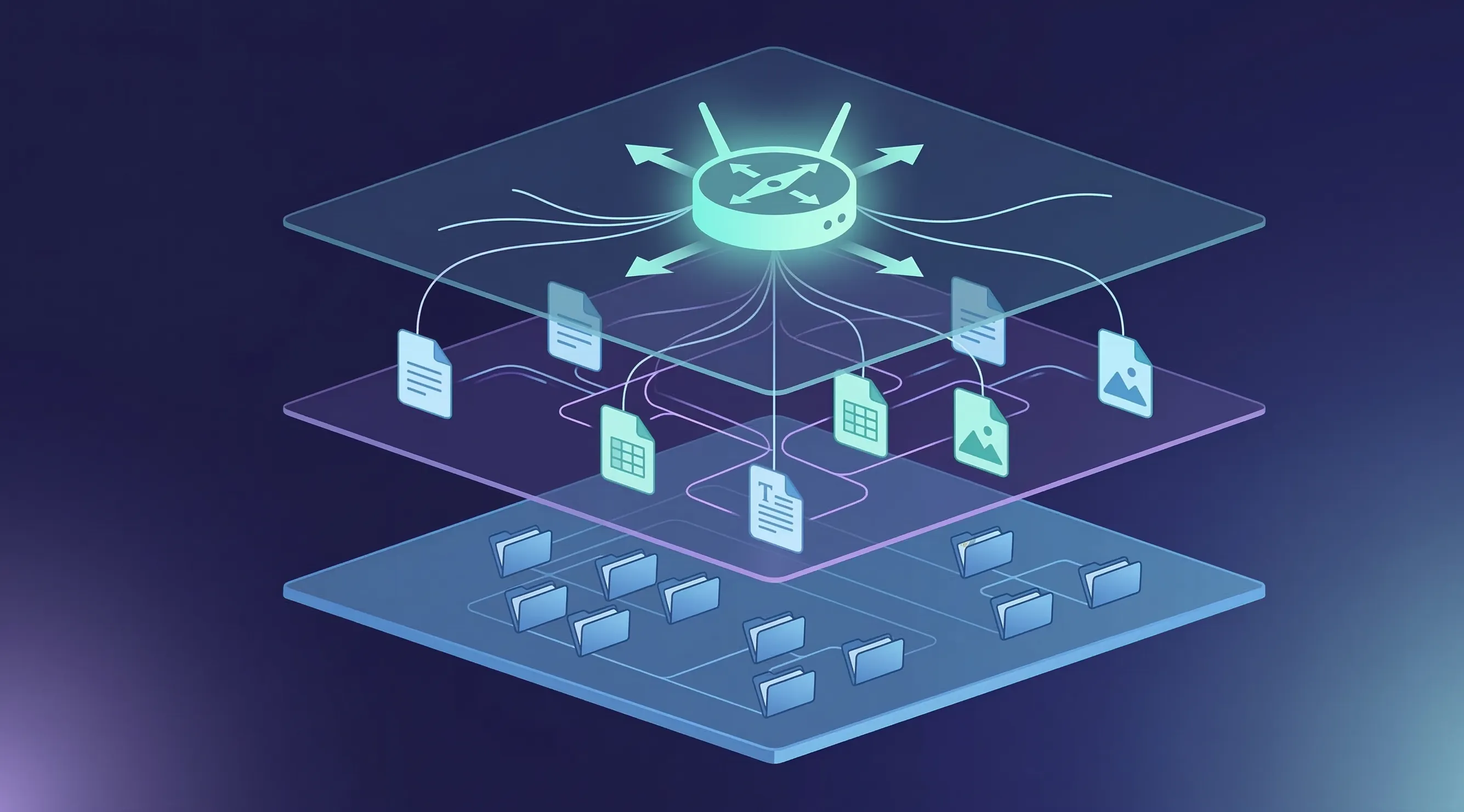
Picture your workspace as a building. Layer one is the lobby directory — the sign that tells you which department is on which floor. Layer two is the department itself, with its own procedures, references, and way of working. Layer three is the actual desk where work gets done, with its files organized and its outputs neatly labeled. Each layer has a specific job, and the magic is that your agent only loads what it needs at each step, keeping its context window clean and focused.
Layer One: The Router
Your root AGENTS.md file is the router. It loads automatically when the agent enters your workspace, and it should contain only the information the agent needs to orient itself and navigate. That means three things: who you are and what this workspace is about (a brief paragraph, not an essay), what the folder structure looks like (a simple tree showing where things live), and a routing table that maps tasks to the right context files and skills.
The routing table is the most important pattern in the entire system. It’s just a simple markdown table that tells the agent: for this type of task, read these files, skip those files, and you might need these skills. Without it, the agent either reads everything and burns through your tokens, or it guesses wrong about what matters and misses what you need. Here’s what one looks like in practice:
| Task | Load | Skip | Skills |
| Writing | /writing/context.md | /production/ | humanizer, blog-style |
| Production | /production/context.md | /writing/ | design-system |
| Research | /research/context.md | /production/ | web-search, deep-research |
That table eliminates three problems at once. Your agent stops wasting tokens on irrelevant context. It stops guessing about which files matter. And you get a single place to edit how your agent approaches each type of work, without touching any code or rebuilding any prompts.
Layer Two: Workspace Context Files
When the routing table sends your agent to a specific workspace — say, your writing room — it reads the context file in that folder. This is where you get specific. Your writing room context might describe your brand voice, your audience, your preferred structure for blog posts, and the process you want the agent to follow: first understand the topic, then find the angle, then write the draft, then catch problems. Your production context might describe your design system, your component library, your quality standards, and the four-stage pipeline your projects follow.
What makes this layer powerful is isolation. When you’re working in your writing room, the agent only reads the writing context. It doesn’t waste tokens loading your production specs or your research methodology. And because each workspace has its own context file, you can tune the agent’s behavior for each type of work independently. Your writing agent can be warm and conversational while your production agent is precise and technical — same underlying model, different instructions loaded based on what you’re doing.
You can also wire skills into these context files. Maybe your writing workspace calls the humanizer skill and a blog co-authoring skill. Maybe your production workspace loads a front-end design skill and a testing skill. The skills aren’t loaded globally where they clutter every task — they’re loaded precisely where they’re needed, inside a thought process that gives them structure and direction.
Layer Three: The Workspace Itself
The third layer is the actual file system where work happens. This is where your drafts live, where outputs go, where reference materials sit. The key here isn’t complexity — it’s naming conventions. If your agent knows that blog drafts follow the pattern blog-title-draft-v1.md and newsletter files follow 2026-03-11-launch-week.md, it can find, organize, and move files without you navigating through folders or pointing it at specific paths.
This sounds simple, and it is. But that simplicity is the point. You don’t need a database. You don’t need a vector store. You don’t need any infrastructure beyond folders and text files. When you tell your agent “pull the v2 demo script and build a spec from it,” it immediately knows where v2 demo scripts live (because the naming convention tells it), it knows to read the spec-building context (because the routing table tells it), and it knows what a good spec looks like (because the workspace context file describes the process). Zero code, zero configuration beyond what you’ve written in plain English.
Why This Beats Building Separate Agents
Most frameworks and platforms want you to build a separate agent for each type of work. A writing agent. A research agent. A production agent. Each one needs its own configuration, its own prompt engineering, its own maintenance. And every time you want them to work together — say, taking a script from your writing room and turning it into an animation in production — you’re building integrations between separate systems that were never designed to share context.
The three-layer architecture sidesteps all of that. You have one agent that becomes what you need based on which workspace it’s operating in. When you say “let’s work on the blog,” it reads the writing context and becomes your writer. When you say “switch to production,” it reads the production context and becomes your builder. And when you say “take the blog post we just wrote and create social media graphics for it,” it already knows where the post lives, what your brand guidelines are, and where to put the output — because all of that is defined in the routing layer.
This is actually how traditional software routing has worked for decades. Function calls, routing tables, directory structures — these patterns are older than most of us. The only thing that’s changed is that the routing is now in natural language instead of code, and your AI agent is the runtime that interprets it. The same engineering principles that made software reliable for fifty years are what make your AGENTS.md architecture reliable now.
How to Write Your First AGENTS.md
If you’re starting from scratch, here’s the structure that works. Open a text file in your workspace root, name it AGENTS.md, and write it in plain English — markdown formatting is nice but not required. Your agent reads this as natural language, so clarity matters more than formatting.
Start with a brief identity section: what this workspace is about, what your product or business does, and who your audience is. Keep this to a paragraph. Then add your folder structure as a simple tree — your agent uses this to know where things live. Next, add your routing table mapping tasks to context files, files to skip, and skills to load. Finally, add your naming conventions so the agent knows how to organize and find files without you pointing it at specific paths.
The whole file might be forty lines. Research suggests keeping your root configuration under 300 lines — frontier models can follow roughly 150 to 200 instructions with reasonable consistency, and your agent’s system prompt already consumes a good chunk of that budget. Shorter is almost always better. Everything in your root AGENTS.md loads on every single task, so every line needs to earn its place. The details belong in your layer-two context files, not in the router. Think of it this way: the router tells the agent where to go, and the workspace context tells it what to do when it gets there.
For the workspace context files, go deeper. Your writing room context might include your brand voice guidelines, your preferred content structure, a checklist for quality, and which skills to invoke at which stage of the writing process. Your production context might describe your tech stack, your design tokens, your build pipeline stages, and your output specifications. Each file is self-contained — everything the agent needs for that workspace should be in that workspace’s context file, with no assumptions about what it read elsewhere.
Skills Inside a System, Not Skills as the System
There’s a subtle but important distinction between installing skills and building a system that uses skills — similar to how MCP servers differ from AI agents themselves. Most people install a handful of skills from ClawHub and treat each one as a standalone capability — a blog skill, a design skill, a research skill. That works, but it’s the equivalent of hiring five specialists who never talk to each other.
When you embed skills into your workspace architecture, they become part of a process rather than isolated tools. Your writing room context might specify: during the research phase, use the web-search skill. During the drafting phase, use the humanizer skill. During the review phase, use the fact-checking skill. The skills fire at the right moment in the right context, and the AGENTS.md routing layer ensures they don’t load when they’re not needed. You can wire up fifteen or twenty skills across your workspaces without any single task loading more than the three or four it actually needs.
The same goes for MCP servers. The Model Context Protocol (MCP) — now an open standard under the Linux Foundation with over 97 million monthly SDK downloads and 10,000 active servers — is what lets your agent talk to external services in a structured way. Understanding the MCP architecture helps here: if your production workspace needs access to a design API or a deployment service, reference the MCP server in that workspace’s context file. If your research workspace needs web search and database access, reference those MCP connections there. The routing table controls when each connection is active, which means your agent isn’t trying to authenticate with services it doesn’t need for the current task.
Making It Yours
The three-layer architecture is a pattern, not a prescription. The specific workspaces, the context files, the naming conventions — all of that needs to reflect how you actually work, not how someone else told you to organize things.
If you’re a content creator, your workspaces might be a script lab, an edit bay, and a distribution hub. If you’re a freelance developer, they might be engineering, client intake, and delivery. If you’re running an agency, you might have workspaces per client, each with their own brand guidelines, approval processes, and output specifications. The folder becomes your app — and what’s a simpler interface than a folder?
The voice and tone sections in your workspace contexts are where personalization matters most. What audience are you writing for? What’s your communication style? What are the things you never want your agent to say? These details live in the workspace context files, not in the root router, because they’re specific to the type of work being done. Your client-facing writing might be formal and precise while your internal notes are casual and quick — different workspace contexts handle that automatically.
And here’s something worth remembering: you don’t have to write any of this by hand if you don’t want to. Tell your OpenClaw agent what your business does, how your work breaks down into categories, and what your processes look like for each one. Ask it to generate an AGENTS.md and workspace context files based on what you described. Review what it creates, edit the parts that aren’t quite right, and you’ve got a working architecture in fifteen minutes. You can edit these files in any text editor — Notepad, TextEdit, VS Code, whatever you prefer. Nothing breaks when you edit them because they’re just English.
The File That Outlasts Every AI Trend
Remember that AGENTS.md file that loads every time your agent starts a task? Before it existed, you were copy-pasting context, re-explaining your business, and losing your train of thought every time the conversation got too long. Now your agent walks into every workspace already knowing the layout, the process, the tools, and where to put the work. One file, three layers, and your agent goes from an impressive chatbot to something that genuinely runs your workflows.
What’s remarkable about this approach is that it isn’t tied to any specific AI model, framework, or trend. The principles behind it — separation of concerns, routing, directory-based organization — have been foundational to software engineering since the 1970s. The three-layer architecture works today with OpenClaw, and it will work tomorrow with whatever comes next, because the underlying logic is timeless even as the tools evolve. You’re not learning a trick that gets replaced next month. You’re learning a pattern that has fifty years of engineering history behind it.
If you haven’t set up your OpenClaw agent yet, openclaw.direct gets you running in about two minutes with 24/7 hosting so your cron jobs and automations keep firing even when your laptop is closed. And if you’ve already got an agent but it’s been living on one-off conversations, create an AGENTS.md tonight. Start with just the router — your business description, your folder tree, and a routing table for two or three task types. You’ll notice the difference the first time your agent starts a conversation already knowing exactly where it is and what to do.
Sources: This article is adapted from Folder as Workspace Architecture for AI Agents on YouTube. Additional information from AGENTS.md Official Standard, Chroma Research on Context Window Degradation, HumanLayer on Writing Good Agent Configuration Files, Linux Foundation Agentic AI Foundation Announcement, and Anthropic on MCP and the Agentic AI Foundation.